Limus URL shortener
Sat Nov 22, 2025
🌐 shortener.limus.dev
Introduction
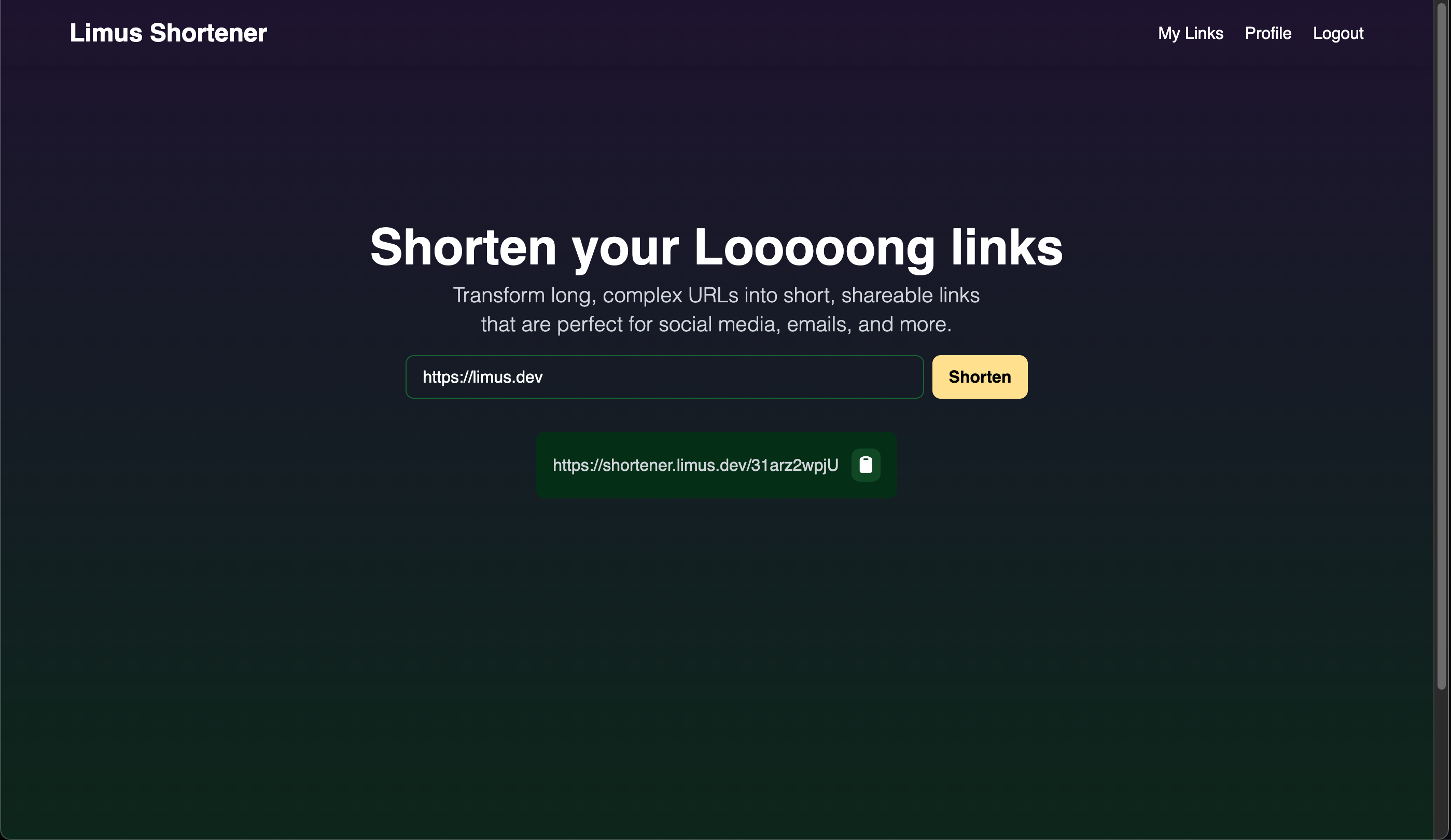
URL shorteners have become an essential tool in our digital toolkit—from marketing campaigns to social media sharing. But have you ever wondered what goes into building one from scratch? In this article, I'll walk you through my journey of building Limus Shortener, a production-ready URL shortening service using modern Go technologies and a unique approach to frontend development.
What makes this project interesting? Instead of reaching for React or Vue, I built the entire frontend using server-side rendering with Go Templ templates and HTMX for dynamic interactions. The result? A blazingly fast, SEO-friendly application with minimal JavaScript and maximum developer productivity.
The Tech Stack: Why These Choices Matter
Backend: Go Ecosystem
I chose Go 1.25 as the foundation for several compelling reasons:
- Performance: Go's compiled nature and efficient concurrency model make it perfect for handling thousands of redirects per second
- Simplicity: The language's straightforward syntax and standard library reduce cognitive overhead
- Production-Ready: Built-in HTTP server, excellent testing support, and battle-tested deployment options
For the HTTP router, I went with Chi—a lightweight, idiomatic router that feels native to Go. Unlike heavier frameworks, Chi stays out of your way while providing essential middleware support.
Database: PostgreSQL + Redis
The data layer uses a dual-database approach:
- PostgreSQL: The source of truth for users, links, and analytics
- Redis: A caching layer that dramatically improves redirect performance
This architecture means the first redirect to a shortened URL hits the database, but subsequent redirects serve from memory—typically under 1ms response time.
Frontend: The Hypermedia Approach
Here's where things get interesting. Instead of building a separate React SPA, I embraced the hypermedia-driven approach:
- Templ: Type-safe Go templating that compiles to optimized Go code
- HTMX: Adds AJAX, WebSockets, and CSS Transitions directly in HTML
- Tailwind CSS: Utility-first styling without leaving the HTML
- Alpine.js: Minimal JavaScript for local interactions
This stack gives you the interactivity of a modern SPA with the simplicity of server-side rendering. No build complexity, no state management libraries, no hydration issues.
Architecture Deep Dive
Clean Architecture Principles
The codebase follows a layered architecture that separates concerns and makes testing straightforward:
Copy code
Handler Layer (HTTP)
       ↓
Service Layer (Business Logic)
       ↓
Repository Layer (Data Access)
       ↓
Database (PostgreSQL/Redis)
Each layer communicates through interfaces, making it easy to swap implementations or add mocks for testing. For example, the LinkService interface defines the contract:
Copy code
type LinkService interface {
    Generate(ctx context.Context, userID int, url string) (*Link, error)
    GetLink(ctx context.Context, shortLink string) (*Link, error)
    List(ctx context.Context, userID int) ([]*Link, error)
    Delete(ctx context.Context, userID, linkID int) error
    RecordVisit(ctx context.Context, linkID int, ipAddress string) error
}
This abstraction means I can inject a mock service during tests or swap the implementation entirely without touching handler code.
The URL Shortening Algorithm
The heart of any URL shortener is the algorithm that generates short codes. I needed something that was:
- Collision-resistant: No two URLs should ever get the same code
- Compact: Short codes should be truly short (not 20 characters)
- URL-safe: Only characters that work in URLs without encoding
- Fast: Generation should be sub-millisecond
My solution uses UUID v7 (time-ordered UUIDs) combined with Base62 encoding:
Copy code
func GenerateShortCode() string {
    u := uuid.Must(uuid.NewV7())        // Time-based UUID
    num := new(big.Int).SetBytes(u[:])  // Convert to big integer
    code := EncodeBase62(num)           // Encode with Base62
    return code[:10]                     // Truncate to 10 chars
}
Why UUID v7? Unlike random UUIDs, v7 includes a timestamp, making them naturally sortable and better for database indexing. The 128-bit UUID space gives us virtually unlimited unique codes.
Why Base62? It uses 0-9, A-Z, and a-z—62 characters total. This is the maximum character set that's URL-safe without encoding. Ten Base62 characters give us 839 quadrillion possible combinations. For context, if you generated 1 million codes per second, you'd run for 26 million years before exhausting the space.
Authentication & Security
Password Handling:
- Passwords are hashed with bcrypt (cost factor 10)
- Never stored or logged in plain text
- Password field excluded from JSON serialization
JWT Authentication:
- Tokens signed with HS256 algorithm
- 24-hour expiration for access tokens
- 7-day refresh token support
- Secure cookie storage
Middleware Protection:
Copy code
func (m *Middleware) RequireAuth(next http.Handler) http.Handler {
    return http.HandlerFunc(func(w http.ResponseWriter, r *http.Request) {
        token := extractTokenFromCookie(r)
        claims, err := validateToken(token, m.config.JWT.Secret)
        if err != nil {
            http.Redirect(w, r, "/login", http.StatusSeeOther)
            return
        }
        ctx := context.WithValue(r.Context(), UserIDKey, claims.UserID)
        next.ServeHTTP(w, r.WithContext(ctx))
    })
}
Caching Strategy
Redis acts as a hot cache for link resolution:
- Cache Hit: Return immediately from Redis (~1ms)
- Cache Miss: Query PostgreSQL, populate cache, return result
- Cache Invalidation: TTL-based expiration ensures freshness
This gives us the best of both worlds: the speed of an in-memory store with the reliability of a persistent database.
The HTMX Experience
Let me show you why HTMX is so powerful. Here's a traditional approach to creating a shortened link:
Traditional SPA:
- User submits form
- JavaScript intercepts submit
- Fetch API makes POST request
- Parse JSON response
- Update DOM with result
- Handle errors in catch block
With HTMX:
Copy code
<form hx-post="/api/links" hx-target="#result" hx-swap="innerHTML">
  <input type="url" name="url" required />
  <button type="submit">Shorten</button>
</form>
<div id="result"></div>
That's it. HTMX handles the AJAX request, and the server returns HTML fragments that get swapped directly into the page. No JavaScript, no state management, no build step.
For dynamic updates, I use HTMX triggers. When a link is created, the server sends an HX-Trigger header:
Copy code
w.Header().Set("HX-Trigger", "refreshLinks")
components.ShortenedResult(link.ShortLink, baseURL).Render(ctx, w)
Other parts of the page listening for this trigger automatically refresh:
Copy code
<div
  hx-get="/api/links"
  hx-trigger="refreshLinks from:body"
  hx-swap="innerHTML"
>
  <!-- Links list updates automatically -->
</div>
This event-driven approach feels like modern JavaScript frameworks, but it's all server-orchestrated.
Database Design & Migrations
The schema is straightforward but powerful:
Users Table:
- Standard auth fields (email, username, hashed password)
- Timestamps for audit trails
- Soft-delete support via
is_activeflag
Links Table:
Copy code
CREATE TABLE links (
    id SERIAL PRIMARY KEY,
    user_id INTEGER NOT NULL REFERENCES users(id) ON DELETE CASCADE,
    link TEXT NOT NULL,
    short_link TEXT UNIQUE NOT NULL,
    visits INTEGER DEFAULT 0,
    created_at TIMESTAMP WITH TIME ZONE DEFAULT CURRENT_TIMESTAMP,
    updated_at TIMESTAMP WITH TIME ZONE DEFAULT CURRENT_TIMESTAMP
);

CREATE INDEX idx_links_user_id ON links(user_id);
CREATE INDEX idx_links_short_link ON links(short_link);
`
Link Visits Table:
- Tracks every click with timestamp and IP
- Foreign key to links table
- Enables analytics and click-through analysis
I use Goose for migrations, which keeps schema changes versioned and reversible:
Copy code
goose -dir internal/database/migrations postgres $DATABASE_URL upDevelopment Experience
Hot Reload with Make
I built a development workflow that watches for changes:
Copy code
make devThis single command:
- Watches Templ files and regenerates on save
- Watches CSS and rebuilds Tailwind
- Hot-reloads the Go server with Air
- Starts PostgreSQL and Redis (via Docker Compose)
The feedback loop is instant—save a template, refresh the browser, see changes.
Type-Safe Templates
Templ templates are actually Go functions that compile to optimized code:
Copy code
templ ShortenedResult(shortLink, baseURL string) {
    <div class="mt-4 p-4 bg-green-50 rounded-lg">
        <p class="text-sm text-gray-600">Your shortened URL:</p>
        <a href={ templ.URL(baseURL + "/" + shortLink) }
           class="text-lg font-semibold text-blue-600 hover:underline">
            { baseURL }/{ shortLink }
        </a>
    </div>
}
Because it's Go code, you get:
- Compile-time safety: Typos and type errors caught before runtime
- IDE support: Autocomplete, go-to-definition, refactoring
- Performance: Templates compile to optimized Go, not interpreted at runtime
Docker Development
The docker-compose.yml orchestrates the entire stack:
Copy code
services:
  postgres:
    image: postgres:alpine
    environment:
      POSTGRES_DB: limus_shortener
    healthcheck:
      test: ["CMD-SHELL", "pg_isready -U postgres"]
      interval: 5s

  redis:
    image: redis:alpine
    healthcheck:
      test: ["CMD", "redis-cli", "ping"]

  app:
    build: .
    depends_on:
      postgres: { condition: service_healthy }
      redis: { condition: service_healthy }
This means anyone can clone the repo and run docker-compose up to get a working environment. No manual database setup, no dependency hell.
Performance Optimizations
Connection Pooling
PostgreSQL connections are expensive. I configured a connection pool with:
- Max open connections: 25
- Max idle connections: 25
- Connection lifetime: 5 minutes
This prevents connection exhaustion under load while reaping stale connections.
HTTP Compression
All responses are compressed with gzip (level 5):
Copy code
r.Use(middleware.Compress(5))This reduces bandwidth by 70-90% for HTML responses, making the app feel faster on slower connections.
Query Optimization
Strategic indexes on frequently-queried columns:
short_linkfor redirect lookups (the hot path)user_idfor listing a user's links- Composite indexes where needed
Combined with Redis caching, the median redirect time is under 2ms.
Challenges & Solutions
Challenge 1: HTMX State Management
Problem: HTMX is stateless—how do you handle complex forms with validation?
Solution: Server-side validation with targeted error messages. When validation fails, return HTML fragments that replace specific form elements:
Copy code
if !utils.IsValidURL(payload.URL) {
    w.WriteHeader(http.StatusBadRequest)
    components.ErrorMessage("Invalid URL format").Render(ctx, w)
    return
}
The error message appears inline without refreshing the page.
Challenge 2: Session Management
Problem: JWT tokens in cookies need to be refreshed without full page reloads.
Solution: HTMX polling with long expiration:
Copy code
<div hx-get="/api/auth/refresh" hx-trigger="every 30m" hx-swap="none"></div>Every 30 minutes, the client pings the server to refresh the token silently.
Challenge 3: Testing Templ Components
Problem: Templ generates Go code—how do you test rendered output?
Solution: Render to a buffer and assert on the HTML:
Copy code
func TestShortenedResult(t *testing.T) {
    buf := new(bytes.Buffer)
    err := components.ShortenedResult("abc123", "http://localhost").Render(context.Background(), buf)
    assert.NoError(t, err)
    assert.Contains(t, buf.String(), "abc123")
}
Deployment & Production
Containerization
The multi-stage Dockerfile optimizes for size and speed:
Copy code
# Stage 1: Build Tailwind CSS
FROM node:20-alpine AS css-builder
COPY package.json .
RUN npm install
RUN npm run build:css

# Stage 2: Build Go binary
FROM golang:1.25-alpine
COPY --from=css-builder /app/static/css/output.css ./static/css/
RUN go build -o limus_shortener ./cmd/api/main.go
CMD ["./limus_shortener"]
This produces a ~50MB image with everything needed to run.
Railway Deployment
I deployed to Railway with zero configuration:
- Connect GitHub repo
- Railway detects Dockerfile
- Auto-provisions PostgreSQL and Redis
- One-click deploy
The railway.toml configures build and health checks:
Copy code
[build]
builder = "dockerfile"

[deploy]
healthcheckPath = "/"
restartPolicyType = "on_failure"
Environment Management
All configuration is environment-driven (12-factor app principles):
- Local:
.envfile - Production: Railway dashboard or Kubernetes secrets
- No hardcoded values
This means the same binary runs everywhere—development, staging, production.
Lessons Learned
1. Server-Side Rendering Is Back (and Better)
The pendulum is swinging back to server-rendered apps. With tools like Templ and HTMX, you get the simplicity of traditional web apps with the UX of modern SPAs. No massive JavaScript bundles, no hydration complexity, just HTML over the wire.
2. Interfaces Make Testing Easy
By depending on interfaces rather than concrete types, I could mock entire layers:
Copy code
type MockLinkService struct {
    GenerateFunc func(ctx context.Context, userID int, url string) (*Link, error)
}

func (m *MockLinkService) Generate(ctx context.Context, userID int, url string) (*Link, error) {
    return m.GenerateFunc(ctx, userID, url)
}
This makes testing handlers trivial—no database required.
3. Makefile > npm scripts
For Go projects, a Makefile is more idiomatic than package.json scripts. It's self-documenting and doesn't require Node.js:
Copy code
.PHONY: help
help:
	@grep -E '^[a-zA-Z_-]+:.*?## .*$$' $(MAKEFILE_LIST) | \
	awk 'BEGIN {FS = ":.*?## "}; {printf "\033[36m%-15s\033[0m %s\n", $$1, $$2}'
Running make help shows all available commands with descriptions.
4. Redis Is Worth the Complexity
Adding Redis increased operational complexity, but the performance gains justified it. Redirects went from 50ms (database query) to 2ms (cache hit). For a URL shortener, that's the difference between fast and instant.
5. UUIDs > Auto-Incrementing IDs
Using UUID v7 for short codes has hidden benefits:
- No enumeration attacks: Users can't guess other short codes
- Distributed generation: Multiple servers can generate codes without coordination
- Time-ordered: Newer links have lexicographically greater codes
Future Enhancements
Here's what I'd add next:
Analytics Dashboard:
- Geographic distribution of clicks
- Referrer tracking
- Time-series graphs with Chart.js
Custom Short Codes:
- Let users choose vanity URLs (e.g.,
limus.sh/mycompany) - Check availability in real-time with HTMX
QR Code Generation:
- Auto-generate QR codes for each short link
- Print-friendly pages for marketing materials
Rate Limiting:
- Prevent abuse with middleware rate limiting
- Redis-backed token bucket algorithm
API Keys:
- OAuth2-style API access
- Programmatic link creation for integrations
Code Highlights
Middleware Chaining
Chi makes middleware composition elegant:
Copy code
r.Group(func(r chi.Router) {
    r.Use(m.RequireAuth)  // Auth required
    r.Get("/my-links", linkHandler.ListPage)
    r.Post("/api/links", linkHandler.GenerateLink)
    r.Delete("/api/links/{id}", linkHandler.Delete)
})
Context-Based Request IDs
Every request gets a unique ID for tracing:
Copy code
r.Use(middleware.RequestID)

func (m *Middleware) Logger(next http.Handler) http.Handler {
    return http.HandlerFunc(func(w http.ResponseWriter, r *http.Request) {
        requestID := middleware.GetReqID(r.Context())
        m.logger.Info("request",
            "id", requestID,
            "method", r.Method,
            "path", r.URL.Path)
        next.ServeHTTP(w, r)
    })
}
Logs are structured and greppable: request id=abc123 method=POST path=/api/links
Graceful Shutdown
The server handles SIGINT and SIGTERM gracefully:
Copy code
quit := make(chan os.Signal, 1)
signal.Notify(quit, syscall.SIGINT, syscall.SIGTERM)
<-quit

log.Info("shutting down server...")
ctx, cancel := context.WithTimeout(context.Background(), 10*time.Second)
defer cancel()

if err := server.Shutdown(ctx); err != nil {
    log.Fatal("server forced to shutdown", "error", err)
}
In-flight requests get 10 seconds to complete before the process exits.
Conclusion
Building Limus Shortener taught me that modern web development doesn't require massive JavaScript frameworks. With the right tools—Go, Templ, HTMX, and Tailwind—you can build fast, maintainable applications that rival any React or Vue app in user experience.
The architecture is simple enough to understand in an afternoon but robust enough for production. The codebase is testable, deployable, and extensible. And most importantly, it's fun to work with.
If you're tired of complex build pipelines, state management libraries, and JavaScript fatigue, give the hypermedia approach a try. You might be surprised how productive you can be when you embrace the simplicity of sending HTML over the wire.
Resources
- Source Code: github.com/mustaphalimar/limus-shortener
- Live Demo: shortener.limus.dev
- Technologies Used:
Let's Connect
I'm always excited to discuss Go, web architecture, or developer tooling. Find me on:
- GitHub: @mustaphalimar
- X: @limusdev
- LinkedIn: @mustaphalimar
- Email: mustaphalimar6@gmail.com
If you found this interesting or have questions, drop a comment below or open an issue on GitHub. Happy coding! 🚀
This article reflects my experience building a production URL shortener. Your mileage may vary, and I'd love to hear about your approach to similar problems.